Updated on 2011.12.12

シングルスターVPNの構成例

概要

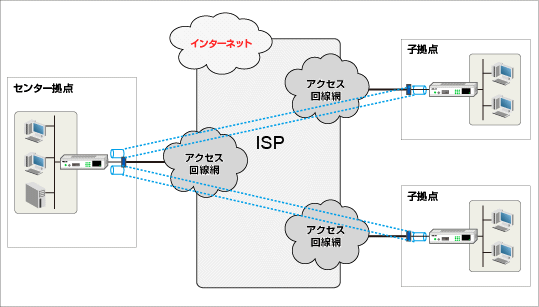
親拠点を頂点としたスター型のVPN ネットワークです。
VPN 親機にSEIL[X1] を1 台使用し、子拠点ごとに1 台ずつ配備したSEIL[B1] を束ねます。静的ルーティングのみでVPN を構成するため、最もコンフィギュレーションを容易に作成出来る利点があります。
IPsec-VPN の実現にはSEIL が保持するIPsec インタフェース機能を用いるため、IPsec トンネルを仮想的に回線と見立てた柔軟なルーティング設計が可能です。

機器の構成

機器構成

シングルスターSEIL/VPNは親拠点と子拠点の二種類の拠点から構成されます。 各拠点の機器構成を下図に示します。子拠点はA, Bの2拠点ありますが、 各子拠点のIPアドレスの相違及びそれに対応するコンフィグを除き、同一の設定です。 文中の" : "のついた英数字(例S-1:)は機器の識別子として、図中の英数字と対応しています。 single_star_vpn.gif

親拠点

C:親拠点 VPN親機:SEIL/X1
子拠点のVPN子機(A:B:)とVPNトンネルを確立します。 ルーティングは各拠点に対する静的経路と、F:ファイアウォールのLAN側に対するデフォルト経路を設定します。
【配線】:
LAN0ポート→S-1:へ接続
LAN1ポート→S-2:へ接続
R:インターネット接続ルータ:SEIL/X1
親拠点のインターネット接続のゲートウェイとなります。 グローバルセグメントをLAN側に作成します。
S-1:Layer-2 スイッチ
C:とF:のLAN側を中継します。        
S-2:Layer-2スイッチ
C:とF:のWAN側を中継します。        
F:ファイアウォール
親拠点、及び、親拠点経由の各子拠点のインターネット通信について、VPN親機に代わり、NAT、セキュリティコントロールを一括して実施します。 VPN装置では、顧客独自のセキュリティフィルタは記述せず、親・子拠点間をつなぐIPsecパケットと、NTPサーバへのアクセスを除いて通信を許可しないフィルタ設定にとどめています。

子拠点A

A:子拠点A VPN子機:SEIL/B1
親拠点のVPN親機C:と1本のVPNトンネルを確立します。 また、LAN側ローカルのアドレスはLAN側ネットワークのデフォルトゲートとして提供されます。 デフォルト経路はVPNトンネル(親拠点C:)へ向け、インターネットへのアクセスは親拠点を経由するようにします。
【配線】:
LAN0ポート→LAN側ネットワークへ接続
LAN1ポート→モデム/メディアコンバータへ接続

子拠点B

B:子拠点B VPN子機:SEIL/B1
A:と同様に、親拠点のVPN親機C:と1本のVPNトンネルを確立し、 LAN側ローカルのアドレスはLAN側ネットワークのデフォルトゲートとして提供されます。 デフォルト経路はVPNトンネル(親拠点C:)へ向け、インターネットへのアクセスは親拠点を経由するようにします。
【配線】:
LAN0ポート→LAN側ネットワークへ接続
LAN1ポート→モデム/メディアコンバータへ接続

IPアドレス設計

実際のネットワーク環境に併せて変更する必要のあるIPアドレス情報を下記に示します。
10.x.xx.xxx:太字のアドレスはISPから割り当てられたグローバルアドレスです。

親拠点

C:親拠点 VPN親機
I/F Address 備考
lan0 192.168.0.1/24 親拠点のLAN側ローカル
lan1 10.0.0.2/29 親拠点のWAN側グローバル
ipsec0 unnumbered 子拠点Aとのトンネル
ipsec1 unnumbered 子拠点Bとのトンネル
R:インターネット接続ルータ
I/F Address 備考
lan0 10.0.0.1/29 インターネットへのゲートウェイ
pppoe0 unnumbered 接続サービスに依存
F:ファイアウォール
I/F Address 備考
lan0 192.168.0.2/24 LAN内へのゲートウェイ
lan1 10.0.0.3/29 WAN側グローバル

子拠点A

A:子拠点A VPN子機
I/F Address 備考
lan0 192.168.1.1/24 子拠点AのLAN側のローカル
pppoe0 10.0.1.1/32 子拠点AのWAN側グローバル
ipsec0 unnumbered 親拠点とのトンネル

子拠点B

B:子拠点B VPN子機
I/F Address 備考
lan0 192.168.2.1/24 子拠点BのLAN側ローカル
pppoe0 10.0.2.1/32 子拠点BのWAN側グローバル
ipsec0 unnumbered 親拠点とのトンネル

その他のホスト

NTPサーバ
I/F Address 備考
--- 10.123.0.1 インターネット上のNTPサーバ

コンフィグと解説

ここでは、以下の機器について設定内容を解説します。
  • Index:
  • C: 親拠点 VPN親機 コンフィグ:解説
  • A: 子拠点A VPN子機 コンフィグ:解説
  • B: 子拠点B VPN子機 コンフィグ:解説

親拠点 VPN親機:コンフィグ


hostname "Center"
timezone "Japan"
environment login-timer 300
option ip monitor-linkstate on
option ip update-connected-route on
option ipv6 monitor-linkstate on
option ipv6 update-connected-route on
interface lan0 media auto
interface lan0 add 192.168.0.1/24
interface lan1 media auto
interface lan1 queue normal
interface lan1 add 10.0.0.2/29
interface lan2 media auto
interface pppoe0 over lan1
interface ipsec0 tunnel 10.0.0.2 10.0.1.1
interface ipsec0 mtu 1500
interface ipsec0 tcp-mss 1358
interface ipsec0 unnumbered
interface ipsec1 tunnel 10.0.0.2 10.0.2.1
interface ipsec1 mtu 1500
interface ipsec1 tcp-mss 1358
interface ipsec1 unnumbered
bridge disable
bridge ip-bridging on
bridge ipv6-bridging on
route add default 192.168.0.2
route add 10.0.1.1/32 10.0.0.1
route add 10.0.2.1/32 10.0.0.1
route add 192.168.1.0/24 ipsec0
route add 192.168.2.0/24 ipsec1
route add 10.123.0.1/32 10.0.0.1
route dynamic rip disable
route dynamic ospf disable
route dynamic redistribute static-to-rip disable
route dynamic redistribute static-to-ospf disable
route dynamic redistribute ospf-to-rip disable
route dynamic redistribute rip-to-ospf disable
route dynamic redistribute connected-to-rip enable
route dynamic redistribute connected-to-ospf enable
route dynamic pim-sparse disable
route6 dynamic ripng disable
route6 dynamic redistribute static-to-ripng disable
route6 dynamic redistribute connected-to-ripng enable
route6 dynamic pim-sparse disable
filter add Operation01 interface lan1 direction in action pass protocol 50 src 10.0.1.1/32 dst 10.0.0.2/32 state disable logging on enable
filter add Operation02 interface lan1 direction in action pass protocol 50 src 10.0.2.1/32 dst 10.0.0.2/32 state disable logging on enable
filter add Operation03 interface lan1 direction in action pass protocol tcpudp src 10.0.1.1/32 srcport 500 dst 10.0.0.2/32 dstport 0-65535 state disable logging on enable
filter add Operation04 interface lan1 direction in action pass protocol tcpudp src 10.0.2.1/32 srcport 500 dst 10.0.0.2/32 dstport 0-65535 state disable logging on enable
filter add Operation05 interface lan1 direction in action pass protocol tcp src 10.123.0.1/32 srcport 0-65535 dstport 123 state disable logging on enable
filter add Deny01 interface lan1 direction in action block state disable logging on enable
nat timeout 900
nat logging off
nat upnp off
nat upnp interface lan1
nat proxy sip add port 5060 protocol tcpudp
dhcp disable
dhcp mode server
dhcp interface lan0 enable
dhcp interface lan0 expire 24
dhcp interface lan0 pool 192.168.0.2 253
dhcp interface lan0 dns add 192.168.0.1
dhcp6 client disable
dhcp6 client interface pppoe0
dns forwarder enable
dns forwarder add ipcp
ntp enable
ntp server add 10.123.0.1
ike interval 40s phase1-timeout 01m phase2-timeout 02m20s
ike auto-initiation enable
ike preshared-key add "10.0.1.1" "IKEpresharedKEY"
ike preshared-key add "10.0.2.1" "IKEpresharedKEY"
ike proposal add IKEP01 encryption 3des hash sha1 authentication preshared-key dh-group modp1024 lifetime-of-time 1d
ike peer add EdgeA address 10.0.1.1 exchange-mode main proposals IKEP01 tunnel-interface enable
ike peer add EdgeB address 10.0.2.1 exchange-mode main proposals IKEP01 tunnel-interface enable
ipsec security-association proposal add SAP01 pfs-group modp1024 authentication-algorithm hmac-sha1 encryption-algorithm 3des lifetime-of-time 03h
ipsec security-association add EdgeA tunnel-interface ipsec0 ike SAP01 esp enable
ipsec security-association add EdgeB tunnel-interface ipsec1 ike SAP01 esp enable
cbq link-bandwidth 100Mbps
snmp disable
snmp community "public"
snmp trap disable
syslog debug-level off
syslog facility local1
syslog remote off
translator timeout 300
encrypted-password admin zbQfJgwX/zs7g
encrypted-password user mdnLSuRIq2qvI
encrypted-password-long admin $1$fc38iNId$1j0JZ1Om1U7aQDFywH/Me.
encrypted-password-long user $1$9GG.0oc5$1ke/cnFTWgbOQ1n0nTOsu.
resolver disable
rtadvd disable
httpd disable
sshd hostkey rsa1 none
sshd hostkey rsa auto
sshd hostkey dsa auto
sshd enable
telnetd disable
vendor OEM

親拠点 VPN親機:解説

interface lan0
VPN親機C:のLAN側プライベートアドレスを設定します。 lan0インタフェースに親拠点LAN内に対応するIPアドレスとサブネットマスクを設定します。
interface lan1
VPN親機C:のWAN側グローバルアドレスを設定してください。 lan1インタフェースに親拠点WANに対応するIPアドレスとサブネットマスクを設定します。
interface ipsec0
VPN親機C:とVPN子機A:間のトンネル(IPsecインタフェース)を設定します。 子機ごとにそれぞれに対するIPsecインタフェースの設定が必要です。

- tunnel
始点はVPN親機C:のWAN側グローバルアドレス、終点はVPN子機A:のWAN側グローバルアドレスを設定します。

- mtu
IPsecインタフェースのMTUを指定します。

- tcp-mss
IPsecインタフェースのTCP MSS調整値を指定します。 フレッツ回線は1358、専用線接続やYahoo!BBは1460、それら以外(不明な場合を含む)は1280を指定します。

- unnumbered
IPsecインタフェースにはIPアドレスを付与せずunnumberedとします。
interface ipsec1
ipsec0インタフェースと同様に、VPN親機C:とVPN子機B:間のトンネルを設定します。
route
VPN親機C:のルーティングを設定します。

- add default 192.168.0.2
VPN親機C:のデフォルト経路は、ファイアウォールのLAN側へ向けます。

- add 10.0.1.1/32 10.0.0.1
  add 10.0.2.1/32 10.0.0.1
VPN子機A:及びB:のグローバルアドレス(IPsecインタフェースのトンネル終点)宛の経路を インターネット接続ルータのアドレスへ向けます。

- add 192.168.1.0/24 ipsec0  add 192.168.2.0/24 ipsec0
子拠点A及び子拠点BのLAN側ローカルネットワーク宛の経路をIPsecインタフェースへ向けます。

- add 10.123.0.1/32 10.0.0.1
NTPサーバ宛の経路をインターネット接続ルータのアドレスへ向けます。
filter
VPN親機C:のIPフィルタを設定します。前提として、親拠点LAN内及び親拠点経由の子拠点とインターネット間の通信は、ファイアウォール装置を必ず経由させる構成としています。そこで、VPN親機へ設定するIPフィルタは、拠点間の通信を最低限許可する設定にとどめています。

- add Operation01
  add Operation02
  add Operation03
  add Operation04
  add Operation05
  add Deny01
親・子拠点間をつなぐIPsecパケットと、NTPサーバによるアクセスはPass、その他すべての通信はBlockします。
  
フィルタ設定表
I/F direction action protocol src : srcport dst : dstport
lan1 in pass 50(esp) 10.0.1.1/32 : --- 10.0.0.2/32 : ---
lan1 in pass 50(esp) 10.0.2.1/32 : --- 10.0.0.2/32 : ---
lan1 in pass tcpudp 10.0.1.1/32 : 500 10.0.0.2/32 : 500
lan1 in pass tcpudp 10.0.2.1/32 : 500 10.0.0.2/32 : 500
lan1 in pass tcp 10.123.0.1/32 : 0-65535 --- : 123
lan1 in block --- --- : --- --- : ---
ntp
VPN親機C:のNTP機能を設定します。 保守・管理やトラブルシュート時に正しい時刻の情報を取得可能になります。
ike interval , phase1/2-timeout
IKEセッションのネゴシエーションのリトライ間隔、応答待ち時間を調整します。
ike auto-initiation enable
VPN親機C:が起動/再起動した際に自動的にIKEセッションを開始します。
ike preshared-key
識別子をVPN子機それぞれのグローバルアドレス(トンネル終端アドレス)とし、そのVPN子機に対応する(子機の台数分の)事前共有鍵を設定します。 事前共有鍵の文字列はVPN子機ごとに異なる文字列を割り当てることも出来ます。
ike proposal
鍵交換時の安全性を確保するための暗号アルゴリズムの組み合わせなどを指定するIKEプロポーザルを設定します。 鍵交換を行う機器同士では共通のプロポーザルが設定されている必要がありますが、対ごとに(使用する機器に合わせて)異なるプロポーザルを設定することも可能です。 ここでは全拠点で共通のプロポーザルを使用するため、1行のみ設定しています。
ike peer
鍵交換を行う相手(peer)について設定します。 子機ごとに、トンネル終端のグローバルアドレスや使用するIKEプロポーザルを指定します。 鍵交換モード(exchange-mode)はメインモードとし、IPsecインタフェースを使用するため "tunnel-interface enable"を設定します。
ipsec security-association proposal
IPsec通信で実際に使用する暗号アルゴリズムの組み合わせなどを指定するIPsec-SAプロポーザルを設定します。 IKEプロポーザル同様、拠点の対ごとに異なるパラメータを指定することも可能ですが、ここでは共通のプロポーザルを使用します。
ipsec security-association
子機と暗号パケットの送受信を行うIPsecトンネルを定義するセキュリティアソシエーション(IPsec-SA)を設定します。 親機と子機の対応ごとに設定し、IPsecインタフェースを使用するため"tunnel-interface ipsecX "、 IPsec-SAプロポーザルは前段で設定した"SAP01"、IKEで鍵交換を行い、ESPを有効にすることを指定します。
encrypted-password
機器の管理パスワードを設定します。 コンフィグ上では暗号化された状態となり、実際のパスワード文字列とは異なるものが表示されます。 設定時は"password admin","password user"コマンドを使用し、必ずadmin,user両方の管理パスワードを設定してください。

子拠点A-VPN子機:コンフィグ

hostname "EdgeA"
timezone "Japan"
environment login-timer 300
option ip monitor-linkstate on
option ip update-connected-route on
option ipv6 monitor-linkstate on
option ipv6 update-connected-route on
ppp add ISP01 keepalive 30 ipcp enable ipcp-address on ipcp-dns on ipv6cp disable authentication-method chap identifier pppaccount1@example.jp passphrase PPPPASSWD tcp-mss auto
interface lan0 media auto
interface lan0 add 192.168.1.1/24
interface lan1 media auto
interface lan1 queue normal
interface lan2 media auto
interface pppoe0 over lan1
interface pppoe0 ppp-configuration ISP01
interface ipsec0 tunnel 10.0.1.1 10.0.0.2
interface ipsec0 mtu 1500
interface ipsec0 tcp-mss 1358
interface ipsec0 unnumbered
bridge disable
bridge ip-bridging on
bridge ipv6-bridging on
route add default ipsec0
route add 10.0.0.2/32 pppoe0
route add 10.123.0.1/32 pppoe0
route dynamic rip disable
route dynamic ospf disable
route dynamic redistribute static-to-rip disable
route dynamic redistribute static-to-ospf disable
route dynamic redistribute ospf-to-rip disable
route dynamic redistribute rip-to-ospf disable
route dynamic redistribute connected-to-rip enable
route dynamic redistribute connected-to-ospf enable
route dynamic pim-sparse disable
route6 dynamic ripng disable
route6 dynamic redistribute static-to-ripng disable
route6 dynamic redistribute connected-to-ripng enable
route6 dynamic pim-sparse disable
filter add Operation01 interface pppoe0 direction in action pass protocol 50 src 10.0.0.2/32 dst 10.0.1.1/32 state disable logging on enable
filter add Operation02 interface pppoe0 direction in action pass protocol tcpudp src 10.0.0.2/32 srcport 500 dst 10.0.1.1/32 dstport 500 state disable logging on enable
filter add Operation03 interface pppoe0 direction in action pass protocol tcp src 10.123.0.1/32 srcport 0-65535 dstport 123 state disable logging off enable
filter add Deny01 interface pppoe0 direction in action block state disable logging on enable
nat timeout 900
nat logging off
nat upnp off
nat upnp interface lan1
nat proxy sip add port 5060 protocol tcpudp
dhcp disable
dhcp mode server
dhcp interface lan0 enable
dhcp interface lan0 expire 24
dhcp interface lan0 pool 192.168.0.2 253
dhcp interface lan0 dns add 192.168.0.1
dhcp6 client disable
dhcp6 client interface pppoe0
dns forwarder enable
dns forwarder add ipcp
ntp enable
ntp server add 10.123.0.1
ike interval 40s phase1-timeout 01m phase2-timeout 02m20s
ike auto-initiation enable
ike preshared-key add "10.0.0.2" "IKEpresharedKEY"
ike proposal add IKEP01 encryption 3des hash sha1 authentication preshared-key dh-group modp1024 lifetime-of-time 1d
ike peer add Center address 10.0.0.2 exchange-mode main proposals IKEP01 tunnel-interface enable
ipsec security-association proposal add SAP01 pfs-group modp1024 authentication-algorithm hmac-sha1 encryption-algorithm 3des lifetime-of-time 03h
ipsec security-association add Center tunnel-interface ipsec0 ike SAP01 esp enable
cbq link-bandwidth 100Mbps
snmp disable
snmp community "public"
snmp trap disable
syslog debug-level off
syslog facility local1
syslog remote off
translator timeout 300
encrypted-password admin YfszqOHiN3kF6
encrypted-password user hyBEvasRkF2sE
encrypted-password-long admin $1$WfvGWSBn$7ztvZVtlps77QVgUnTj5p0
encrypted-password-long user $1$rhcDs5cn$mw9nykIBOPYwgvQvGqFg./
resolver disable
rtadvd disable
httpd disable
sshd hostkey rsa1 none
sshd hostkey rsa auto
sshd hostkey dsa auto
sshd enable
telnetd disable
vendor OEM

子拠点A VPN子機:解説

ppp
子拠点におけるVPN子機がインターネットに接続するため、PPPoE接続を設定します。 利用する接続サービスに応じて、適切なアカウント情報を設定します。
interface lan0
VPN子機A:のLAN側プライベートアドレスを設定します。 lan0インタフェースに子拠点AのLAN内に対応するIPアドレスとサブネットマスクを設定します。
interface pppoe0
pppoe0インタフェースをインターネット接続に使用するよう設定します。 unnumbered接続の接続サービスを利用する場合には、"interface pppoe0 unnumbered"を追加設定し、 ppp設定の"ipcp-address"は"off"とします。
interface ipsec0
VPN子機A: とVPN親機C: 間のトンネル(IPsecインタフェース)を設定します。 子拠点間の通信は親拠点を経由させるため、トンネルは親拠点に対する1つだけ設定します。
route
VPN子機A:のルーティングを設定します。

- add default ipsec0
VPN子機のデフォルト経路はVPN親機とトンネルを張るIPsecインタフェースへ向けます。 他の拠点宛の通信やインターネット上のホストへの通信も、VPN越しに親拠点を経由して行います。

- add 10.0.0.2/32 pppoe0
IPsecトンネルの終端(親機のWAN側グローバルアドレス)宛の経路は インターネット(PPPoEインタフェース)へ向けます。 デフォルト経路のみの設定では、IPsec通信を確立するための通信も未確立の IPsecインタフェースへ向けられIPsec通信が確立しません。

- add 10.123.0.1/32 pppoe0
NTPサーバ宛の経路をインターネット(PPPoEインタフェース)へ向けます。
filter
VPN子機A:のIPフィルタを設定します。 子拠点と、各拠点間及びインターネット間の通信は、親拠点を必ず経由する構成としています。そこで、IPフィルタは、拠点間の通信を許可する設定にとどめています。具体的には、親・子拠点間をつなぐIPsecパケットと、NTPサーバによるアクセスはPass、その他すべての通信はBlockします。
ntp
VPN子機A:のNTP機能を、VPN親機C:と同様に設定します。 保守・管理やトラブルシュート時に正しい時刻の情報を取得可能になります。
ike interval , phase1/2-timeout , auto-initiation
VPN親機C:と同様に、ike の調整パラメータを設定します。
ike preshared-key
識別子をVPN親機C:のグローバルアドレス(トンネル終端アドレス)とし、 VPN親機C:に対応する事前共有鍵を設定します。
ike proposal
VPN親機C:で設定するものと同じIKEプロポーザルを設定します。 VPN親機側で拠点ごとに異なるIKEプロポーザルを設定する場合には、子拠点A向けの設定に合わせて設定します。
ike peer
VPN親機C:を鍵交換相手とするike peerを設定します。 トンネル終端となるのVPN親機のグローバルアドレスを指定し、VPN親機の設定と同様に使用するIKEプロポーザルや鍵交換モード等を設定します。
ipsec security-association proposal
VPN親機で設定するものと同じIPsec-SAプロポーザルを設定します。 IKEプロポーザル同様、VPN親機で拠点ごとに異なるIPsec-SAプロポーザルを設定する場合には、 子拠点A向けの設定に合わせて設定します。
ipsec security-association
VPN親機と暗号パケットの送受信を行うIPsecトンネルを定義する、 IPsecセキュリティアソシエーション(IPsec-SA)を設定します。 VPN親機と接続するipsec0インタフェースについて、IPsec-SAプロポーザルやIKE、ESPの使用を指定します。
encrypted-password
VPN親機と同様に、VPN子機A:の管理パスワードを設定します。 VPN親機と同じパスワード文字列である必要はありません。

子拠点B VPN子機:コンフィグ


hostname "EdgeB"
timezone "Japan"
environment login-timer 300
option ip monitor-linkstate on
option ip update-connected-route on
option ipv6 monitor-linkstate on
option ipv6 update-connected-route on
ppp add ISP01 keepalive 30 ipcp enable ipcp-address on ipcp-dns on ipv6cp disable authentication-method chap identifier pppaccount2@example.jp passphrase PPPPASSWD tcp-mss auto
interface lan0 media auto
interface lan0 add 192.168.2.1/24
interface lan1 media auto
interface lan1 queue normal
interface lan2 media auto
interface pppoe0 over lan1
interface pppoe0 ppp-configuration ISP01
interface ipsec0 tunnel 10.0.2.1 10.0.0.2
interface ipsec0 mtu 1500
interface ipsec0 tcp-mss 1358
interface ipsec0 unnumbered
bridge disable
bridge ip-bridging on
bridge ipv6-bridging on
route add default ipsec0
route add 10.0.0.2/32 pppoe0
route add 10.123.0.1/32 pppoe0
route dynamic rip disable
route dynamic ospf disable
route dynamic redistribute static-to-rip disable
route dynamic redistribute static-to-ospf disable
route dynamic redistribute ospf-to-rip disable
route dynamic redistribute rip-to-ospf disable
route dynamic redistribute connected-to-rip enable
route dynamic redistribute connected-to-ospf enable
route dynamic pim-sparse disable
route6 dynamic ripng disable
route6 dynamic redistribute static-to-ripng disable
route6 dynamic redistribute connected-to-ripng enable
route6 dynamic pim-sparse disable
filter add Operation01 interface pppoe0 direction in action pass protocol 50 src 10.0.0.2/32 dst 10.0.2.1/32 state disable logging on enable
filter add Operation02 interface pppoe0 direction in action pass protocol tcpudp src 10.0.0.2/32 srcport 500 dst 10.0.2.1/32 dstport 500 state disable logging on enable
filter add Operation03 interface pppoe0 direction in action pass protocol tcp src 10.123.0.1/32 srcport 0-65535 dstport 123 state disable logging off enable
filter add Deny01 interface pppoe0 direction in action block state disable logging on enable
nat timeout 900
nat logging off
nat upnp off
nat upnp interface lan1
nat proxy sip add port 5060 protocol tcpudp
dhcp disable
dhcp mode server
dhcp interface lan0 enable
dhcp interface lan0 expire 24
dhcp interface lan0 pool 192.168.0.2 253
dhcp interface lan0 dns add 192.168.0.1
dhcp6 client disable
dhcp6 client interface pppoe0
dns forwarder enable
dns forwarder add ipcp
ntp enable
ntp server add 10.123.0.1
ike interval 40s phase1-timeout 01m phase2-timeout 02m20s
ike auto-initiation enable
ike preshared-key add "10.0.0.2" "IKEpresharedKEY"
ike proposal add IKEP01 encryption 3des hash sha1 authentication preshared-key dh-group modp1024 lifetime-of-time 1d
ike peer add Center address 10.0.0.2 exchange-mode main proposals IKEP01 tunnel-interface enable
ipsec security-association proposal add SAP01 pfs-group modp1024 authentication-algorithm hmac-sha1 encryption-algorithm 3des lifetime-of-time 03h
ipsec security-association add Center tunnel-interface ipsec0 ike SAP01 esp enable
cbq link-bandwidth 100Mbps
snmp disable
snmp community "public"
snmp trap disable
syslog debug-level off
syslog facility local1
syslog remote off
translator timeout 300
encrypted-password admin AzP5IE0L1HqpM
encrypted-password user cLWQ/QbI0uO7I
encrypted-password-long admin $1$UBOCJ/sq$SmPD4VF1FrwvyG9wVtwhq0
encrypted-password-long user $1$KxjpiiSb$I4l6RbjMw292.CurS0lUt1
resolver disable
rtadvd disable
httpd disable
sshd hostkey rsa1 none
sshd hostkey rsa auto
sshd hostkey dsa auto
sshd enable
telnetd disable
vendor OEM

子拠点B VPN子機:解説

VPN子機B:のコンフィグについては、VPN子機A:と異なる点(子拠点(子機)をさらに追加する場合に 最低限変更が必要な点)についてのみ解説します。
ppp
一般的なPPPoE接続サービスでは接続拠点ごとにアカウントが必要となりますので、 拠点B用に用意したアカウント情報を設定します。
interface lan0
VPN子機B:のLAN側プライベートアドレスを設定します。 lan0インタフェースに子拠点BのLAN内に対応するIPアドレスとサブネットマスクを設定します。
interface ipsec0
VPN子機B:とVPN親機C:間のトンネル(IPsecインタフェース)を設定します。 始点にVPN子機B:のWAN側グローバルアドレス、終点にVPN親機C:のWAN側グローバルアドレスを指定します。
filter
VPN親機C:からのIPsecパケットをPASSするフィルタ設定につき、宛先アドレスをVPN子機B:のWAN側グローバルアドレスに設定します。

このページの先頭へ